Most people learning about Bitcoin security focus on the dramatic stuff — hackers, physical attacks, government seizure. These make for good headlines. But in practice, the most common ways people lose Bitcoin are far less cinematic.
After years of helping clients secure their Bitcoin, I've noticed a consistent pattern: the losses that actually happen tend to come from basic mistakes, misplaced trust, or setups that are too complex to manage reliably. The rare, dramatic scenarios are genuinely rare.
This guide covers some of the most common ways people lose Bitcoin — from beginner mistakes to sophisticated attacks — so you understand what you're actually up against and what to do about it.
1. Never Truly Owning Your Bitcoin
The first way to lose Bitcoin is to never own it in the first place.
When you buy Bitcoin on an exchange and leave it there, that Bitcoin is not yours. You have a number on a screen that represents a claim — and that claim is only as good as the exchange's solvency, honesty, and security posture. If the exchange fails, gets hacked, or gets shut down, you may have no recourse.
History has not been kind to exchanges:
- Mt. Gox (2014) — The largest exchange at the time was hacked and lost 850,000 Bitcoin. It took over a decade for creditors to see partial repayment.
- BTC-e (2017) — Shut down by US authorities with zero warning. Customers had no access to their funds overnight.
- Bitfinex (2016) — Hacked for nearly 120,000 Bitcoin. Some customers eventually received partial compensation; many did not.
- QuadrigaCX (2019) — The Canadian exchange's founder died (under disputed circumstances) allegedly taking the private keys with him. Approximately $190M in customer funds were locked.
- Celsius (2022) — Chased yield with customer funds, couldn't honor withdrawals, and filed for bankruptcy. Customers received only partial recovery.
- Voyager (2022) — Same story. Filed for bankruptcy after exposure to a failed crypto fund. Customers received only partial recovery.
- FTX (2022) — One of the most high-profile collapses in crypto history. Customer deposits were allegedly gambled with by the company's leadership.
The fix is the same in every case: withdraw your Bitcoin to a wallet you control. That's what self-custody means. If you haven't done this yet, it's the single most impactful thing you can do for your Bitcoin security.
2. Seed Phrase Mistakes
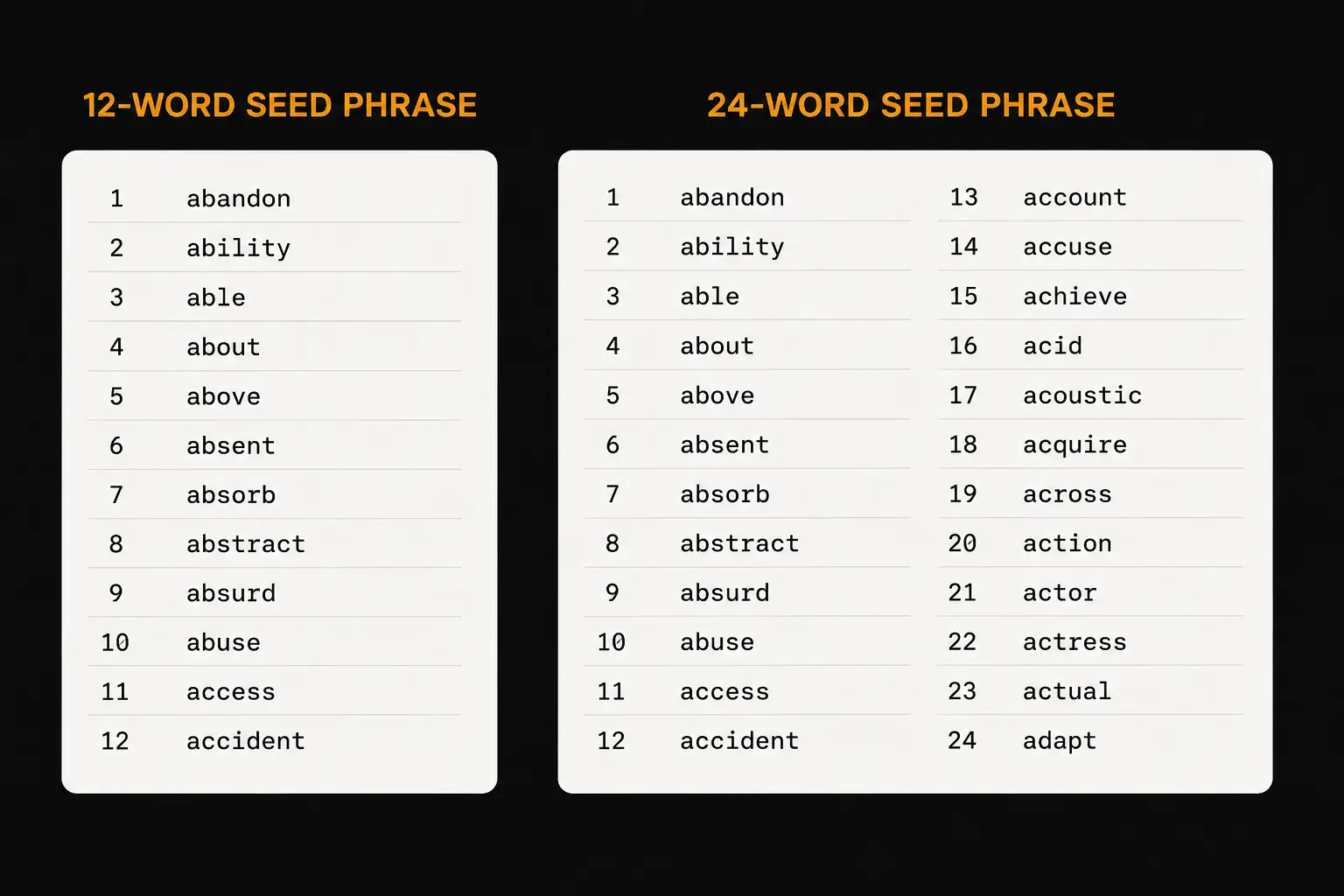
Once you're in self-custody, the most important thing you're protecting is your seed phrase — the 12 or 24 words that back up your entire wallet. Whoever has those words controls that Bitcoin.
There are several ways this goes wrong.
Not backing up at all
Some people set up a wallet, skip writing down the seed phrase, and assume they'll get to it later. Then the device is lost, damaged, or stops working. Without the seed phrase, that Bitcoin is gone with no recovery path.
Inaccurate backup
It's not enough to write the words down — they need to be accurate, spelled correctly, and in the right order. A single wrong word can make recovery very difficult or impossible without the technical knowledge to fix it. Check your backup immediately after writing it, and verify it periodically.
Storing it digitally
This is one of the most common mistakes. People photograph their seed phrase, type it into a Notes app, drop it in a Google Doc, or save it to a password manager. The problem: anything stored on an internet-connected device is potentially accessible to anyone who gets into that device.
Never store your seed phrase digitally. Not in a photo. Not in a document. Not in a password manager. Not in your email. Nowhere online.
Storing it in plain sight
A seed phrase sitting on a desk, pinned to a corkboard, or left in a drawer isn't secret. Anyone who walks past it — a cleaner, a guest, a contractor — could recognise it, photograph it quietly, and drain your wallet days later with no sign of a break-in.
Not protecting it physically
Paper deteriorates. Water, fire, a spilled drink — any of these can destroy a paper backup. If you hold meaningful amounts of Bitcoin, a metal seed backup (steel plate, capsule, or stamp kit) is worth the investment. Paper works as a starting point; metal is the long-term solution.
Not using a hardware wallet
For any significant amount, you need a hardware wallet — a dedicated device that keeps your seed phrase completely offline. Software wallets on phones or computers are exposed to the operating system, apps, and network traffic on that device. Hardware wallets isolate the seed from all of that.
3. Basic Scams and Fraud
These scams are widely known but still claim victims every day, often because they've become more sophisticated over time.
Fake investment platforms
A stranger contacts you — by DM, email, or even phone — with an investment opportunity. You deposit Bitcoin into what looks like a legitimate trading platform. Your "balance" grows. When you try to withdraw, there's a tax to pay, or a verification fee. You pay it. There's another fee. Then another. You never receive anything.
This is called a "pig butchering" scam. The name refers to fattening the pig before slaughter — they build trust over time, show growing balances, then drain the victim completely.
The rule: anyone promising you a return on Bitcoin you send them is a scammer. Full stop.
Giveaway scams
Fake social media accounts impersonating public figures (Elon Musk, Michael Saylor, exchanges, wallet companies) promise to double any Bitcoin you send them. Some use deepfake video and AI voice cloning to make these look convincing.
Recovery scams
If you've already lost Bitcoin in a scam, expect follow-on contact from "recovery specialists" who claim they can retrieve your funds — for a fee. They cannot. There is no technology that reverses Bitcoin transactions. Anyone claiming otherwise is running a second scam on top of the first.
Impersonation scams
Scammers pose as exchange support, hardware wallet companies, or even government agencies — telling you your account has been compromised, your funds are at risk, or you owe taxes in Bitcoin. They create urgency and then direct you to send Bitcoin or reveal your seed phrase.
Legitimate companies will never ask for your seed phrase. Ever.
4. Advanced Scams and Social Engineering
These attacks go further than mass-market fraud. They're targeted, researched, and personalized — which makes them far more convincing.
The Ledger data breach fallout
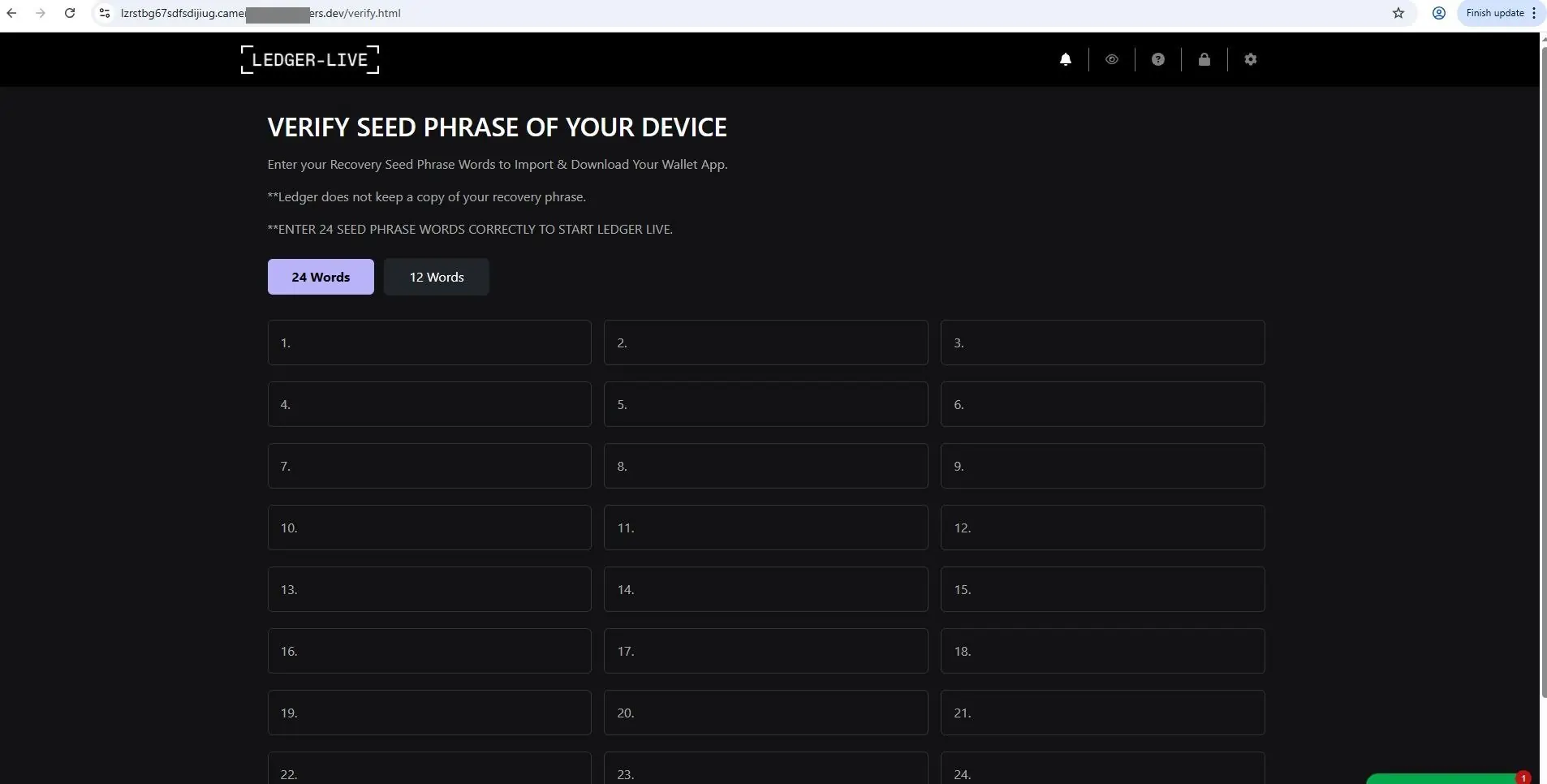
In 2020, Ledger's customer database was leaked, exposing names, home addresses, and email addresses of over 270,000 customers. Scammers used this data to run personalized attacks. They called victims, recited back their personal details to establish trust, then directed them to a convincing fake Ledger website asking them to enter their seed phrase to "secure their wallet."
The victim believed the call was legitimate because the attacker knew who they were and where they lived. The psychological trigger was fear: "If I don't do this, I'll lose my Bitcoin." Victims entered their seed phrases. Their wallets were drained immediately.
SIM swapping
Attackers contact your mobile carrier, impersonate you, and convince them to transfer your phone number to a SIM they control. Once they have your number, they reset passwords on exchanges, email accounts, and two-factor authentication apps. This attack has been used to steal large amounts of Bitcoin from exchange accounts.
Defense: don't rely on SMS-based 2FA for anything important. Use an authenticator app, or better yet, a hardware security key.
Fake customer support
Scammers monitor social media for people posting about Bitcoin problems — "my Ledger isn't connecting," "I can't access my wallet." They reply or DM offering to help, then walk the victim through "troubleshooting" steps that end with entering the seed phrase somewhere online.
If you need support, go to the official website directly. Never click a DM.
Inheritance and family targeting
Scammers research individuals with known Bitcoin holdings and target family members — particularly after a public figure or high-net-worth individual's death. They'll pose as lawyers, financial advisors, or distant relatives to extract private keys or trick family members into signing fraudulent transactions.
The universal defense against all of these attacks: your seed phrase never leaves your hardware wallet. Regardless of who's asking, what they know about you, or how urgent it sounds — you do not enter your seed phrase anywhere online.
5. Malware and Fake Wallets
Clipboard hijacking
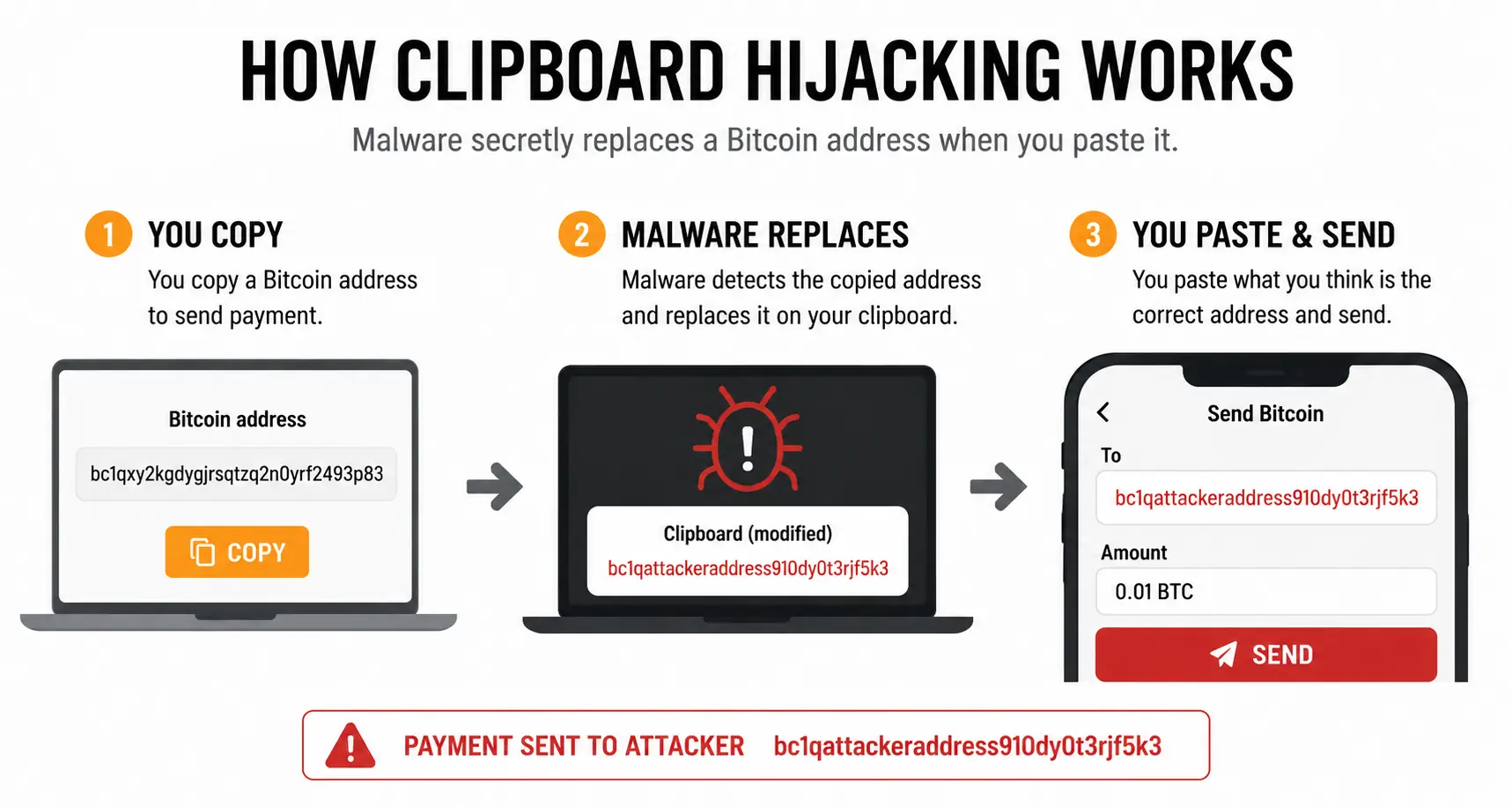
This is the malware attack most relevant to Bitcoin users, including those who use hardware wallets. The malware runs silently in the background and monitors your clipboard. When it detects you've copied a Bitcoin address, it replaces that address with the attacker's address. You paste, you click send — and your Bitcoin goes to the wrong place with no reversal possible.
The defense: always verify the destination address on your hardware wallet's screen before approving any transaction. If the address on the screen doesn't match what you intended, don't approve it.
Keyloggers
Software that records every keystroke you type. If you type out a seed phrase on a compromised computer, it's captured. This is one reason you should never type a seed phrase into any device — and why hardware wallets have you enter PINs on the device itself rather than the computer.
Fake wallet apps
Fraudulent apps that mimic legitimate wallets. You "import" your wallet by entering your seed phrase — and it goes straight to the attacker.
Examples from the wild:
- Fake Sparrow Wallet apps have appeared on the Apple App Store. Sparrow Wallet has never had a mobile app. One case involved someone losing seven Bitcoin after downloading a fake version and entering their seed phrase.
- Fake Electrum wallets have been distributed through phishing campaigns and fake websites. Some versions redirect funds from pending transactions.
- Fake Trezor and Ledger apps have appeared on both the Google Play Store and Apple App Store, stealing seed phrases from users who imported existing wallets.
- Browser extension wallets (particularly MetaMask clones) have been published as malicious extensions in the Chrome Web Store.
The defenses are simple:
- Always download wallet software from the official website — verify the URL yourself.
- Never download wallet apps from app stores unless the official website explicitly directs you there.
- Verify PGP signatures on software you download when possible.
- Never enter your seed phrase into any internet-connected device.
6. Physical Attacks
Physical attacks on Bitcoin holders — sometimes called wrench attacks — are a real threat, though they're far less common than the online threats above.
These range from home invasions where an attacker demands access to your wallet, to street-level attacks targeting known Bitcoin holders. France has seen a notable rise in such incidents in recent years, partly traced back to a case where a tax official was found to have sold investor asset data to criminal groups.
That said, most private holders who don't publicly discuss their Bitcoin holdings are at low risk of being specifically targeted.
Defenses against physical attacks:
- Multisig — distributes your Bitcoin across multiple keys in different locations, so no single point of coercion gives an attacker access to your funds
- Passphrase — adds a hidden layer to your wallet that an attacker wouldn't necessarily know to demand
- Decoy PIN / brick PIN — some hardware wallets let you set a secondary PIN that either opens a decoy wallet with small funds (for plausible deniability) or bricks the device entirely
The evil maid attack
A more subtle physical threat. Someone with legitimate access to your property — a cleaner, contractor, or anyone else who might be briefly alone near your hardware wallet — swaps your real device for a convincing fake. When you enter your PIN on the fake device, it logs and transmits that PIN to the attacker, who can then use it on your real wallet.
Defenses:
- Hide your hardware wallet
- Store it somewhere tamper-evident (e.g., a sealed bag you'd notice has been opened)
- Use a passphrase — even if someone gets your device and PIN, the passphrase keeps the main wallet inaccessible
7. Not Understanding Your Setup
This is the most underappreciated threat on the entire list — and in my experience having helped hundreds of people with their Bitcoin setups, it's also one of the most common.
The risk isn't just losing access. It's securing your Bitcoin in a system you don't fully understand, and then discovering you can't actually use it when you need to.
Following tutorials without understanding what's happening
Many people set up a hardware wallet by following a step-by-step guide. They get it working. But they don't understand how any of it actually works — they couldn't explain what a seed phrase is, they've never done a restore, and they'd have no idea where to start if something went wrong.
The fix: set up test wallets with small amounts, send transactions, and practice restoring from the seed phrase. Once you can walk through your entire setup reliably — including a full restore — you understand it.
Over-complicating the setup
Some people build setups that are technically impressive but practically unmanageable. Common examples:
- Multisig with no documentation — setting up a 2-of-3 multisig but not recording the wallet descriptor or which keys go with which device, making recovery impossible even with the seeds
- Passphrases applied inconsistently — adding passphrases to some keys in a multisig setup but not others, then forgetting which seeds had passphrases and which didn't
- Nested complexity — combining multisig, passphrases, obscure derivation paths, and custom scripts into a system that no one (including the owner) can reliably reconstruct
- Missing one piece — multisig setups require ALL signing devices (or seeds), the wallet descriptor, and any passphrases. Losing a single component can mean permanent loss
I had a client using a multisig wallet where two of the three seed phrases also had passphrases applied. She had no idea how to spend her Bitcoin. It took two hours of careful work together to reconstruct what she'd done. Once we identified which seeds had passphrases and applied them correctly, we were able to move the funds to a safer, simpler setup.
If she had been missing even one seed phrase, one passphrase, or the wallet descriptor — the Bitcoin would have been unrecoverable.
The core rule: use the most secure setup you can that you fully understand. Security built on confusion isn't security — it's a lock you can't open from either side.
Putting It Together
Most Bitcoin losses aren't the result of state-level hackers or Hollywood heists. They come from:
- Leaving Bitcoin on exchanges
- Seed phrase mistakes
- Trusting the wrong people
- Malware exploiting common behaviors
- Setups that are too complex to use reliably
The good news: each of these threats has a practical defense, and none of them require advanced technical skills. They require understanding — knowing how your setup works, why each piece matters, and what to do if something goes wrong.
If you want to build that understanding properly — starting from scratch and working through real wallet setups along the way — The Bitcoin Course covers all of it. Or if you'd prefer personal help reviewing your current setup, we can work through it together.